HTPC Hybrid: Part 1
The Desktop & Setup
Posted Oct 18, 2026
Another pure impulse buy, a good one though. I bought another cheap Optiplex. It was initially only going to be a HTPC, but I realized how much of an upgrade it’ll be for me when compared to a Core Duo 2 vPro with 4gbs of RAM. It would be pretty much double the power, and be a comfortable daily driver. It will still be used as a HTPC though, when in “TV Mode”, I’ll have either Kodi or ES-DE open.
I’m of course going with Linux for the project, it seems like a pain to stick with Windows 7 on hardware that can definitely handle a modern distro. The distro I’m choosing is Debian with IceWM. I have an extreme dislike towards Wayland tiling things like sway. They’re lightweight at first, but to actually make them look good you need hella bloatware. At least that was my experience with Sway.
Prior to the new PC arriving, I tested the setup roughly on the old one. Even on that, it felt really snappy and took the same amount of memory to run idle as Win 7. The Hardware on the new PC that I’ll be dubbing “The Yamamoto” isn’t the latest and greatest, but still an amazing daily for 20 dollars.
It comes with a i5, 8gbs of RAM, and two expansion slots for a wifi pcie card and a low profile graphics card. I plan on getting both eventually, but the wifi card is more of a priority because I want bluetooth. From what I can tell, an ax2000 is the one I need to get. I want the GPU mainly to get better emulation performance and maybe be able to do PS2.
Harddrive wise I have a 160gb for the boot drive and two 500gbs ones for Media (Games, Music, TV,etc). I need to get another chassis for one of them so I’m limited on space a bit. They’re pretty cheap so it’s fine. Need to also get a long aux cable + splitter so I can connect to my AV and my audio amp for my desk.
Since I recently got a DVD burner, I decided I wanted to install from that rather than flashing a USB. I lost the one I usually use and don’t want to wipe the only other one I have. I opt for UEFI since the bios supports it. The first issue I run into is the DVD won’t boot. I tested the DVD on another PC so I know it’s not the disc.
I spent an entire hour attempting to boot into Debian’s retarded installer. After the 500th attempt, Yamamoto spits out some error about the graphics. Which is confusing due to me having integrated graphics. The entire thing is fixed by me yanking the RAM out then putting it back in. My only guess is that the previous owner had a graphic card or something then didn’t reset the memory after removing it?
Sadly, IceWM wasn’t included as a desktop that you are able to download straight from the installer. I had to substitute for XFCE. I could’ve technically not downloaded any WM then installed IceWM for terminal, but I wanted some kind of interface in case shit went wrong.
It turns out shit did go wrong, not with IceWM though. For some reason the DVD rom is set as the main server for apt. This issue happened last time but a little differently, because during the step of installation where it asks where do you want to install the extra dependencies from, I chose “nyc.debian.org/…” since I live extremely close to the city. It switched to that server for my main one instead of the typical “deb.debian.org/...” server. It's a really easy fix, but you'd think they'd have some sort of automated process at the end of install to change it back to default.
For basic utilities, I use the default other than the file manager and office suite. I prefer XFE over most others, it does have a problem with showing mounted drives. It takes a while when compared to something like PCMANFM. I’m thinking of maybe switching terminals since I haven’t been able to figure out how to Copy/Paste within XFCE. I really like the font and how lightweight it is though. I also prefer OpenOffice over Libre since it launches much faster.
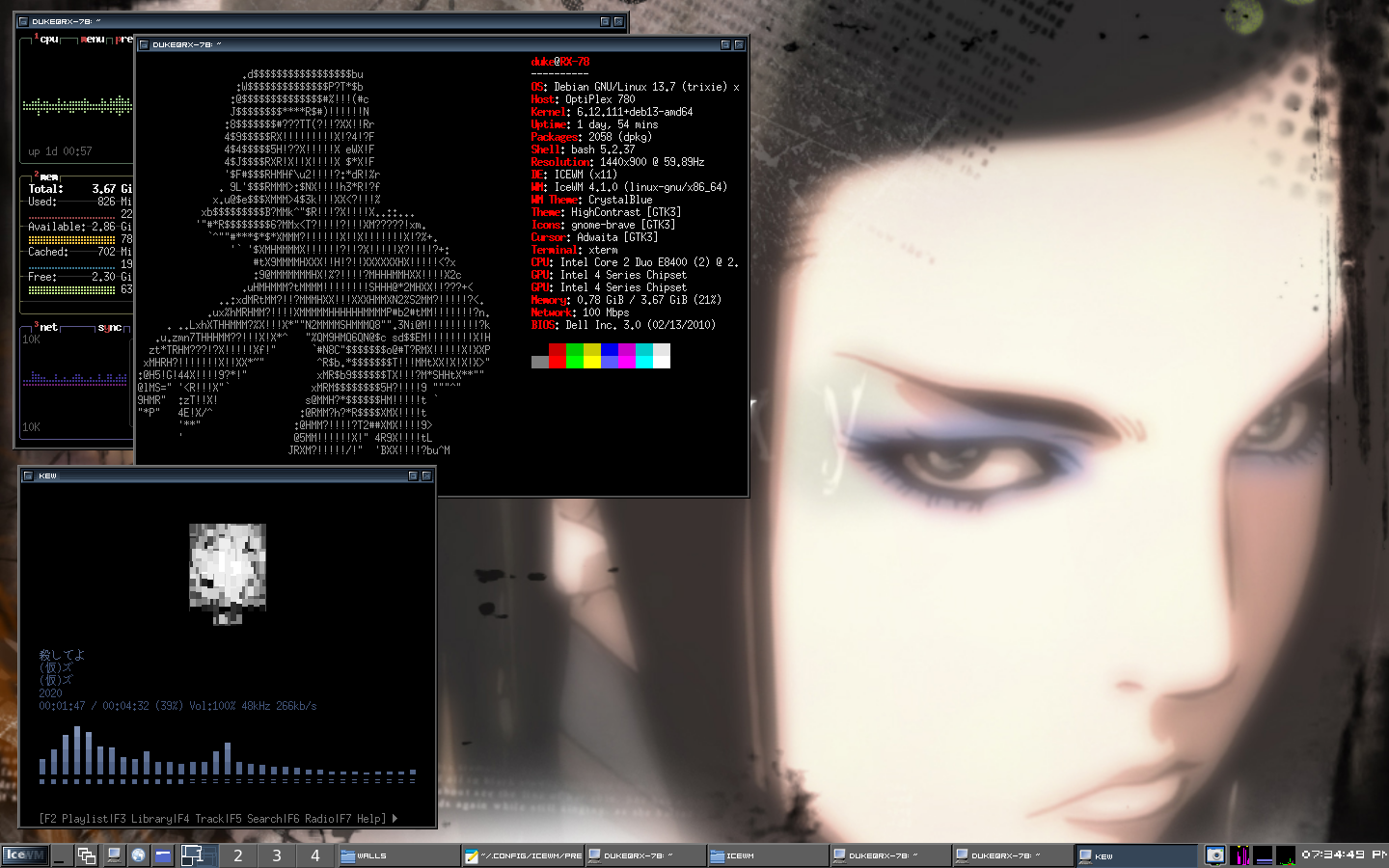
Onto the ricing side of things. Due to my distro being too recent, I had to install another system info fetcher other than neofetch. I went with Hyfetch since it's already on Debian's repo and is easily customizable. I don't particulary care for the gay stuff, but if it works it works. Funnily enough, there being so many flags makes it easy to match the ASCII to the desktop's pallete. So thank you gay people.
I really hate how the default font look on most themes, it stand out too much and is too big . I decided to install a really classic font that would go with most themes, 04b_08. A good thing about ricing on IceWM is the really easy system for themes. It's a similar system to Windows 7, where you can download and load themes that others made by simply putting it into a folder. Then it has pre-configured seperate dot files that change different parts of the Desktop like the Task Bar or keyboard shortcuts.
Due to extreme retardation on my end, I accidentally deleted the dot files I had already set up previously on my test installation. My blunder ended up causing me to figure out how to make sub folders within the Start Menu, a blessing in disguise I suppose.
A cool thing I found was a TUI Discord client named endcord. It's probably the best third-party Discord client I've ever used, even above Ripcord. It really awesome and uses barley any resources while supporting stuff like VC and Server forum things. I like that it doesn't use AI for development too.
This is the end product of my general use setup, since it's October I went with a Ergo Proxy wallpaper paired with a theme called 'Area 51' (´ ∀ ` *). I'm happy with how it turned out.
|